 Cookie Chomper
Stop clicking cookie banners.
Cookie pop-ups are rejected for you as pages load, even when there's no Reject button. Cookies are never accepted for you.
14 days free, no account or card. Then €0.50 a month, billed €6 yearly. Cancel any time.
Tested on 10,312 websites: of the banners that offered a way to reject, about 9 in 10 were rejected. How we tested
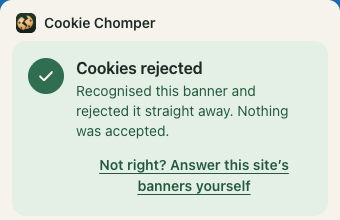
What happens to each kind of cookie banner
-
Rejected
Known banners: rejected straight away.
Hundreds of known cookie banners are recognised straight away and rejected, right on your computer. In our test of more than 10,000 websites, that was more than half of all banners. Sometimes the banner never even shows up.
-
Switched off
No Reject button? The tedious part is done for you.
Some banners only offer “Accept all” and “Settings”. Then the settings are opened, everything the site doesn't need is switched off, and your choice is saved, even when the site calls that button “Save & accept”.
-
Rejected
Home-made banners? They're read like you would read them.
Other sites make their own banner, with “Reject” tucked away in a corner or behind “Settings”. The banner's words are read to find the Reject button, like you would.
For that, a limited part of the banner's words goes to our server. Never the web address, your cookies or what you type into forms. Email addresses and long numbers are blanked out first.
-
Left to you
Pay or accept? That one's your call.
Some sites say: accept our cookies, or pay to get in. You can't reject for free there, so that choice is left to you.
Tested on more than 10,000 websites.
We let Cookie Chomper visit 10,312 websites across Europe: the 313 busiest, and 10,000 picked at random from the rest of the top million. 4,886 of them showed a cookie banner. Leave out the banners that offered no way to reject, and about 9 in 10 were rejected.
- 82% rejected 4,013 banners“Reject all” was pressed, or everything optional was switched off and saved.
- 9% left to you 437 bannersOnly an “Accept” button, or accept-or-pay: no way to reject for free.
- 9% not rejected 436 bannersNo safe way to reject was found, or the rejection didn’t stick. Nothing was accepted here either.
0 “Accept”, “Accept all”, “I agree” or pay buttons pressed. One site’s only save button said “Save & accept”. It was pressed with every optional category switched off, and the site recorded nothing as accepted.
7 in 10 were recognised straight away, on your computer. The rest were read first.
Version 0.1.2, tested 1 October 2026. 4,013 of the 4,449 banners that seemed to offer a way to reject were rejected. A hand check of 30 “no way to reject” banners found 10 that did have one, so the true share is between about 87% and 90%.
Reject all, in 23 languages.
Buttons like “Accept all”, “I agree” or “Pay” are recognised in 23 languages and never pressed. These are the words looked for instead.
- Reject allEN
- Alles weigerenNL
- Alle ablehnenDE
- Tout refuserFR
- Rifiuta tuttoIT
- Rechazar todoES
- Rejeitar tudoPT
- Odrzuć wszystkiePL
- Odmítnout všeCS
- Odmietnuť všetkoSK
- Afvis alleDA
- Hylkää kaikkiFI
- Avvisa allaSV
Known banners are handled right on your computer.
More than half of all banners never leave your computer. When a banner has to be read to find its Reject button, a limited part of its words is sent to our server. Never the web address, your cookies or what you type into forms, and we don't keep a list of the sites you visit.
Independent, and paid for by you.
Cookie Chomper is made by Invisible Shapes, an independent studio in Apeldoorn, the Netherlands. No ads, no tracking, nothing sold. You pay for it, so you're the customer, not the product.
All those cookie banners annoyed me no end. Every time, I tried to find the reject button as quickly as possible, but if I couldn't find it within a few seconds, I pressed accept after all. I did try other extensions, but they were far from working on every cookie banner. So I set out to build a solution myself :)
 Robert IJsselstein, who makes Cookie Chomper
Price
€0.50 a month
The first 14 days are free. Then €6 is billed once a year, until you cancel. No account, no card, nothing to set up.
You pay through Paddle, the payment company that sells Cookie Chomper for us and takes care of the payment, VAT and invoice. Renews yearly; cancel any time. A full refund within 14 days of any payment.
Questions
Chrome says it can read and change all my data. Is that safe?
Cookie banners can appear on any website, so Chrome warns that Cookie Chomper can “read and change” every site. Only what looks like a cookie banner is read, and only its Reject button, or the switches and save button in its settings, is pressed. Your passwords and what you type are never read. Apart from the limited banner text the privacy policy describes, nothing from the page is sent. The privacy policy has the details.
Why pay, when there are free tools?
Free tools know the common banners, and so does Cookie Chomper. The difference is the rest: with many free tools the banner is only hidden, or Accept is clicked for you, and unfamiliar banners are skipped. With Cookie Chomper, cookies are rejected for you, on unusual banners too, and never accepted for you.
Does it work on every site?
Not on every one. In our test of more than 10,000 websites, about 9 in 10 banners that offered a way to reject were rejected. Sites that make you choose between accepting and paying have no free way to reject, so those are left to you. A banner that can't be worked out stays on screen, and the toolbar icon tells you.
Do I need an account?
No. The trial starts when you install it. When you subscribe, Paddle handles the payment; we never see your card.
Who is Paddle?
Paddle is the payment company that sells Cookie Chomper for us, as it does for many other software makers. It takes the payment, adds the right VAT for your country and sends your receipt, so your receipt and bank statement show Paddle's name. Questions about a payment? Email us at hello@cookiechomper.com and we'll sort it out, with Paddle if needed.
What happens when the trial ends?
Cookie banners are no longer rejected for you until you subscribe. Nothing is ever charged unless you subscribe yourself.
How do I cancel or get a refund?
To cancel, open Cookie Chomper's settings (the toolbar icon, then Settings) and click Manage subscription. You can also use the link in Paddle's receipt, or email hello@cookiechomper.com. For a refund, just email us: a full refund within 14 days of any payment. The refund policy has the details.
Something not working?
Email hello@cookiechomper.com with the website's address and what you saw. We read every email.